


How to Change the Sizes of Your Desktop Icon
Table of Contents
Are the sizes of your desktop icons too small or too big, which normally makes your eyes uncomfortable while looking at them? You don’t have to worry about leaving it that way because you can change it to sooth your choice.
Changing the size of your desktop icon on your computer screen is easy, and this post provides a guide on how to do it. Keep reading for the full gist!
You can change your icon sizes in two methods,
- Via the Desktop screen
- Using your mouse
The guidelines for changing the icon sizes via these two methods are outlined below:
Also Check: How to Change the Sizes of Icons on Android Device
How to Change Your Desktop Icon Sizes Via the Desktop Screen
The Icon sizes can be changed via the desktop screen through the following steps below:
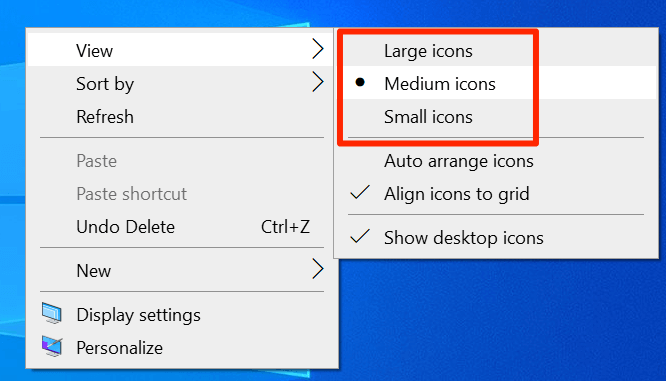
- Right-click on your desktop screen
- Scroll and point the cursor on View
- Proceed to select either “Large Icons,” “Medium Icons,” or “Small Icons” to reduce the sizes and change them to the ones you prefer.

Also see: 4 Steps on How to Change to Desktop Mode in Chrome on Android
How to Change the Desktop Icon Sizes Using Your Mouse
It can also be done through the use of a Mouse.
- Connect your mouse to your desktop computer
- Press and hold the Ctrl on your Desktop
- Then, use the mouse’s scroll wheel to increase or reduce the icon sizes.