SpaceX’s Starlink Installation – Steps on how to install Starlink
Table of Contents
You might be familiar with Starlink and its unlimited data capacity, but that’s not the only impressive aspect. It’s also recognized as one of the fastest satellite internet services around.
However, there’s more to explore about Starlink, and I’ll delve into the details in the following sections. Read through if you’re curious about what Starlink offers, how to purchase it, and the installation process.
What is Starlink?
Starlink, an initiative by SpaceX, the aerospace company established by Elon Musk in 2002, is a satellite internet service designed to offer global coverage. It aspires to extend its capabilities to include global mobile phone service post-2023.
Traditional satellite internet services suffered from high latency and sluggish speeds due to the extensive distance between Earth and geostationary orbit satellites.
In contrast, Starlink employs a constellation of low Earth orbit (LEO) satellites positioned much closer to Earth, significantly reducing latency and enabling faster data transmission. This is the reason behind its reputation as the fastest satellite internet service.
Starlink’s internet service is not mobile and is primarily intended for stationary residential use.
How much is Starlink?
At the same time, a complete kit, including a terminal, mounting tripod, and Wi-Fi router, is priced at $599 (around 330,000 Naira).
How to get Starlink
Visit the Starlink website to obtain an estimated date for the availability of Starlink service in your region.
Setting Up and Unboxing Starlink
Upon unboxing, you’ll discover the Starlink Dish, nicknamed “dishy,” positioned outdoors to establish communication with the satellite. It comes with a detachable cable that connects to the dish pedestal and runs inside the Starlink router.
The Starlink Router/Power Supply is included, providing the Wi-Fi signal and powering the entire system when plugged into an outlet. Additionally, you’ll find the x-shaped Starlink Dish Stand, which supports the dish and enables it to turn and tilt to optimize signal reception automatically.
For a more permanent or residential setup, exploring additional Starlink accessories for various mounting options is suggested.
Setup/Installation
Step 1
- When you unpack your Starlink kit, assemble the dish and mounting base by unplugging the cable from the dish, which comes pre-connected and needs to be disconnected.
- Insert the dish mast into the mounting base.
- Once the mast is securely positioned, connect the 75-foot connector cable with a straight plug connector to complete the setup. Note that the cable ends have differently shaped connectors, allowing for easy identification of the correct end for proper connection.
- Make sure to insert the cable connector until it is fully seated firmly. You’ll hear a click once the plug is properly connected to the socket.


Step 2
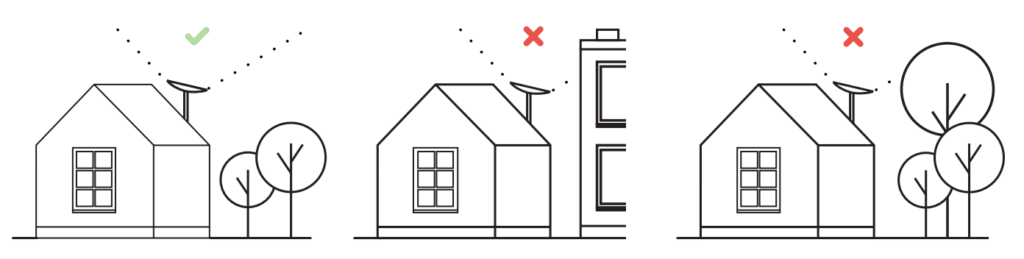
Utilize the Starlink app to align the dish for the best satellite reception. Select a spot with an unhindered view of the sky, and employ the app’s interactive tool to scan the surrounding area.
The dish will automatically adjust itself to stay connected to passing satellites. Suitable mounting spots comprise open fields, rooftops, or elevated structures. Follow the app’s instructions to scan the sky thoroughly and guarantee full coverage within the dish’s field of view.