


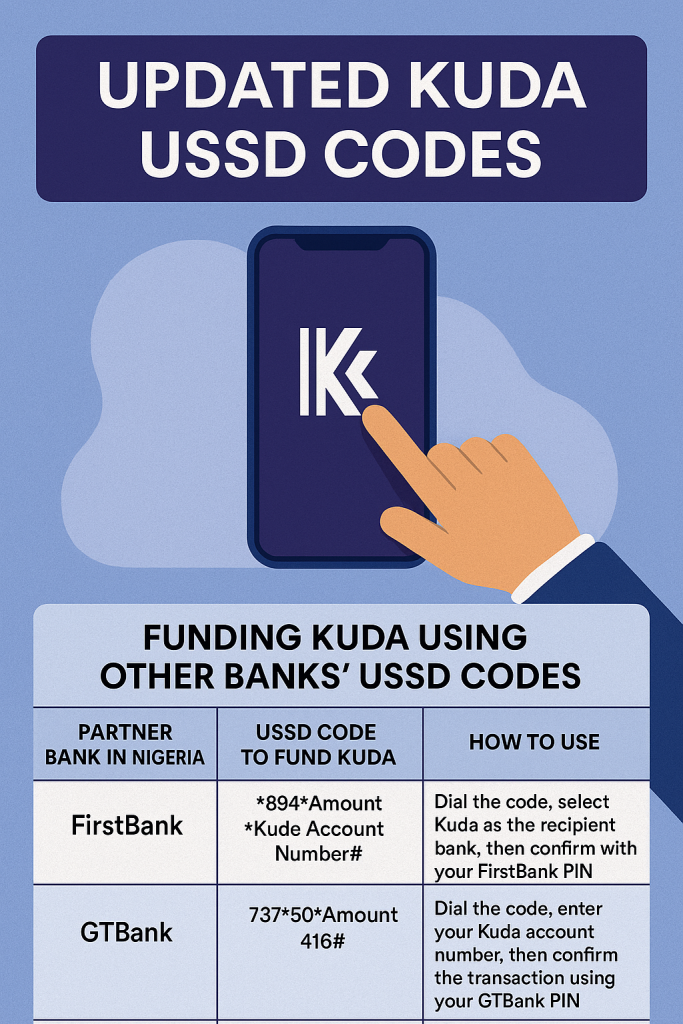
Updated Kuda USSD Codes – The Best Guide 2025
Table of Contents
Kuda is one of Nigeria’s online banking platforms that focuses only on digital banking. Kuda is known to provide a good banking experience through its user-friendly mobile app that has diverse features.
However, one limitation of this bank is the absence of USSD codes for direct banking transactions outside the mobile app.
There are several ways that Kuda users can manage their finances using the Mobile banking app, even without USSD codes.
Things To Know About Kuda Bank
- Kuda Bank was initially called Kudi Money
- Kuda focuses on a digital-first banking model, where the mobile app handles the services needed by users
- There is an absence of USSD codes for direct banking, but users can use other banks’ USSD codes for transactions like funding of Kuda accounts or transferring money.
- The transactions for Kuda Bank are done online, unlike USSD codes that can be used offline.
Benefits Of Using the Kuda Mobile App For Transactions
There are no hidden fees: Kuda offers transparent pricing, and users can carry out transactions for free when using the app.
Fast and reliable: The Kusda app is fast and reliable. Users get instant notifications for transactions, withdrawals, deposits and other services.
Covers essential banking needs: Kuda Bank can be your one-stop shop for all essential banking needs, ranging from balance enquiries to bill payments, and the app is available for both iOS and Android users.
How to Fund Your Kuda Account Using Other Banks’ USSD Codes
Kuda bank does not offer its own USSD codes; users of other banks provide a USSD code for those who need to fund Kuda accounts. Here are the most popular banks in Nigeria, along with their Kuda USSD Codes for money transfer transactions.
USSD Codes For Funding Kuda Through Partner Banks In Nigeria
| Partner Bank In Nigeria | USSD Codes To Fund Kuda | How To Use |
| FirstBank | *894Amount*Kuda Account Number# | Dial the code, select Kuda as the recipient bank, then confirm with your FirstBank PIN. |
| GTBank | 73750Amount416# | Dial the code, enter your Kuda account number, then confirm the transaction using your GTBank PIN. |
| Zenith Bank | *966Amount*Kuda Account Number# | Dial the code, choose Kuda under ‘Other Banks’, then complete the transfer with your Zenith Bank PIN. |
| UBA | *9194*Kuda Account Number *Amount # | Dial the code, select Kuda as the bank, then confirm the transaction using your UBA PIN. |
| Access Bank | *901*Amount*Kuda Account Number# | Dial the code, select Kuda as the recipient, then confirm using your Access Bank PIN. |
| Wema Bank | *945*Kuda Account Number*Amount# | Dial the code, follow prompts to select Kuda, then enter your Wema Bank PIN to complete the transfer. |
How To Manage Your Kuda Account
- Make Use Of The Kuda Mobile App: Download the app from the Google Play Store or the Apple App Store to access all banking services.
- Leverage Partner Bank USSD Codes: Use the codes mentioned above for offline transactions.
- Keep Your Account Details Secure: Always double-check the Kuda account number when using USSD codes from other banks.
- Monitor Transactions Through The App: Even if you use another bank’s USSD code, you can verify all transactions in real-time through the Kuda app.
You Might Have Questions Like
-
Does Kuda Have Its Own USSD Code?
No, it does not. Kuda’s digital-first strategy focuses on mobile app banking, minimising the need for USSD codes.
-
Is It Possible To Check My Kuda Account Balance Using USSD?
No, currently you must log in to the Kuda app to check your balance.
-
How Do I Sign In To My Kuda Account Step By Step?
Step one: Open the app
Step two: Then tap on the option Sign in
Step three: Enter your email address and password
Step four: The Last step is to tap on sign in, and you are logged into your Kuda account.
-
Is It Save To Use Other Banks’ USSD Codes To Fund My Kuda Account?
Yes, it is. The process is secure if you follow standard safety guidelines, such as using your registered phone number and securing your PIN.
-
Are There Fees When Transferring Money To Kuda Using Other Banks’ USSD Codes?
It depends on the bank. Some banks may charge a nominal fee in NGN for transactions conducted via USSD. Always check with your bank for the latest charges.
Conclusion
Although Kuda Bank does not have its own USSD codes at the moment, customers have multiple options for managing their accounts through their mobile app.
The app provides users with features to complete their transactions as they would have done with USSD Codes. The services include top-up airtime, transferring funds with ease, and accessing mobile banking services. It is important to note that an internet connection is required for the app to be used.