


How to Share Your Live Location on WhatsApp With Your Android
Table of Contents
Sharing your live Location on WhatsApp is updating and sharing your real-time location with others. It can be in a group, personal chat, or to everyone, but only those you shared it with can see it.
You can control how long you want it to appear and those you wish to see and remove it when you deem fit. This is one of the end-to-end encryption features on WhatsApp.
There are various ways to share your Live Location on WhatsApp, such as in a group or personal chat. Still, before you can share your Location on WhatsApp, you have to enable the WhatsApp location permission on your Android device and the procedures you will take are listed below:
How to Enable Location Permission on Android
Before sharing your real-time Location on WhatsApp, you must enable location permission on your phone. Below are the guidelines for allowing location permission on your device.
- Go to your Phone Settings app.
- Click on App or App and Notification
- Select WhatsApp from the list of apps displayed
- On the next page, locate Permissions and tap on it
- You will see all the permissions, both the ones you enabled and also those you disabled
- Search for and tap on Location to turn it on
After you have enabled location permission on your phone, you can share your live Location on WhatsApp.
Also Read: How to Exit and Delete a WhatsApp Group Using Your Android and iOS Devices.
How to Share Your Live Location on WhatsApp In a Group or Individual Chat
Sharing your Live Location to a group chat will allow all the group members to access it until it expires, and only those in the group where you shared it will see it.
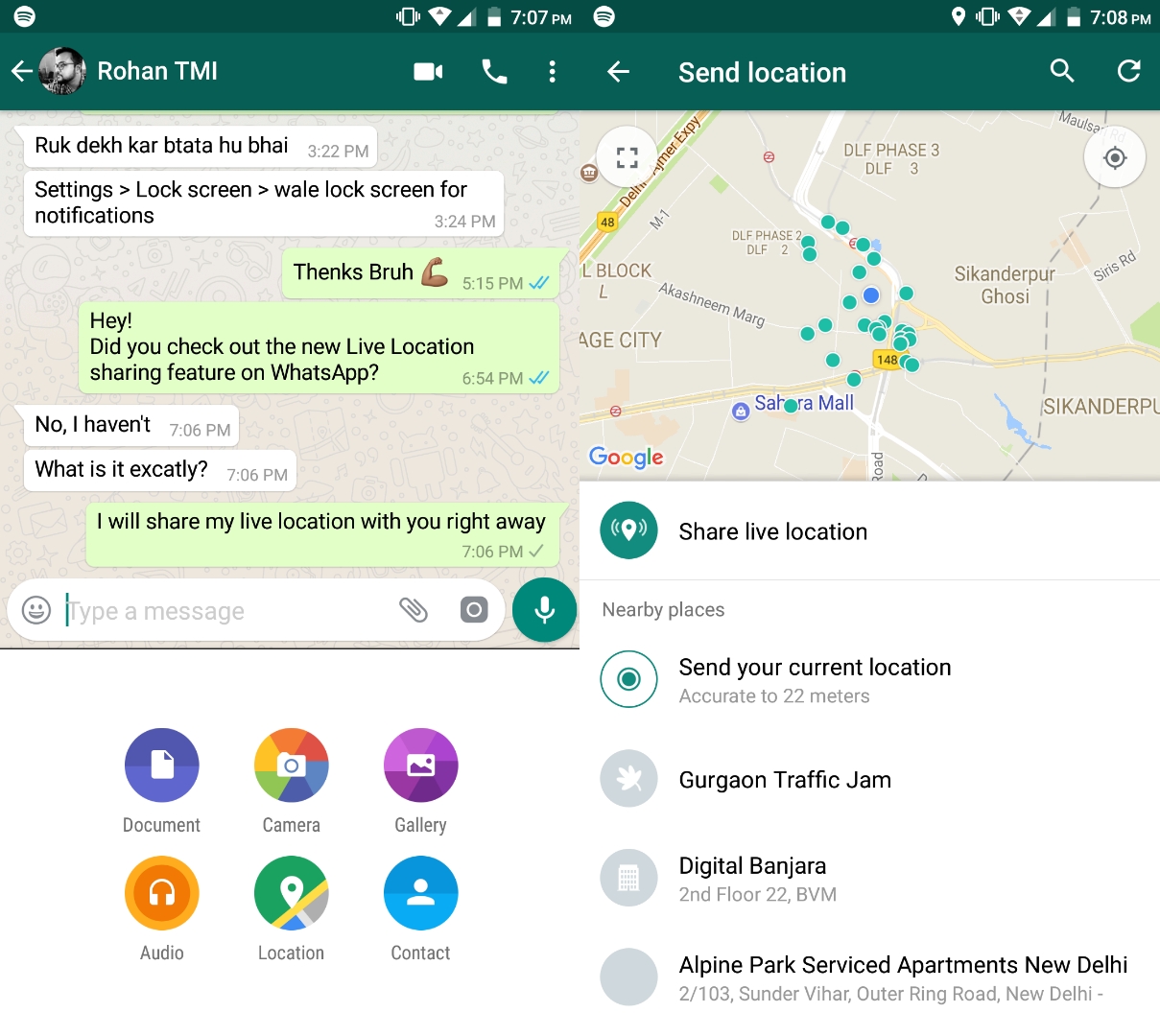

Here are the guidelines on how you can share your live Location on WhatsApp to a specific group or Individual chat with your Android device:
- Open WhatsApp on your phone and tap on the group or individual chat you wish to share your live location to
- Click on the bottom of the phone where this icon is located ->
- Tap on Location
- Then tap on Share Live Location
- Select the duration or the length of time you want it to be shared; people with whom you shared it will not be able to see it after the duration selected has expired.
- Finally, tap on the


Also See: How to Link and Use WhatsApp On The PC Without a Phone: 3 Sure Methods
How to Share Your Live Location on WhatsApp to Everyone Through an Android Phone
Below are the procedures for sharing your real-time Location with everyone on WhatsApp through your Android phone.
- Open WhatsApp on your phone
- Tap on
- Scroll down and tap on Settings
- Tap on Privacy
- And on the next page, scroll down and tap on Live Location
- Select the duration and confirm

Checkout: How to Find WhatsApp Group Links Without an Invite
How to Stop Sharing Your Live Location on WhatsApp
Due to security reasons, you have decided to stop sharing your live Location on WhatsApp either on a group chat, individual chat or to everyone. Here are the best guidelines on how you can do it in a short time.
How to stop sharing your live Location On a Specific group or Individual chat
- Open WhatsApp on your phone
- Tap on the group or individual chat
- Click on Stop Sharing Location
- Tap on Stop
Read also: How to Turn Disappearing Messages On or Off on WhatsApp
How to Stop Sharing Your Location On all Chats on WhatsApp, both Individual and Group
- Open WhatsApp on your device
- Tap on
- Tap on Settings
- Click on Privacy
- Then tap on Live Location on the next page
- Tap on Stop Sharing
- Click on Stop to complete the procedures

You may also like to read about:
- WhatsApp Marketing Strategy: How to Use WhatsApp for Business Promotion
- How to Send and Open “View Once Pictures” on WhatsApp
- How to stop WhatsApp file auto download for Android users (images, audio and videos)
- 4 Steps on How to Create a WhatsApp Call Link
- 4 Steps on How to Clear Your WhatsApp Call Log on the phone